Banner
Showing posts with label tablets. Show all posts

Friday, October 19, 2012

How to Play DVD on Asus PadFone 2?

ASK

  • How can I play DVD on Padfone2's 10 inch display?

Answer

Asus Padfone2


PadFone 2 doesn't allow people to play DVD on it. There isn't any HDMI input port on it. But the 10.1 inch display will really bring us a good experience during watching HD videos. But according to the official parameters, PadFone 2 supports video codec like MPEG4, H.263, and H.264 @HD 1080p. This provides us another way to play DVD on PadFone 2 - convert DVD to video. Leawo DVD Ripper is developed for this problem.

Leawo DVD Ripper is a professional DVD ripper to convert DVD to video in variety of formats, such as avi, mp4, flv, mkv, mpeg, mov, wmv, etc. You are allowed to set the output video parameters, such as the codec. The conversion steps are simple and handy.
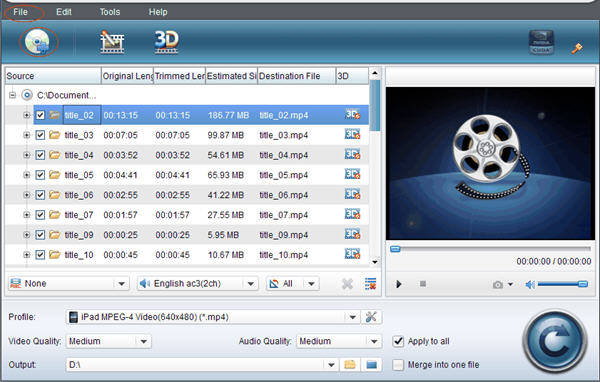
  • Input DVD from local computer to Leawo DVD Ripper.
  • Leawo DVD Ripper
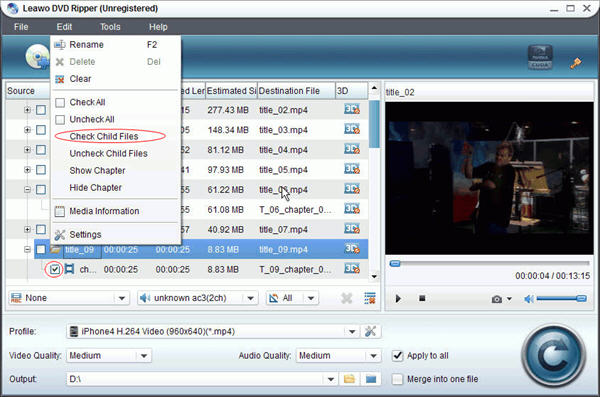
  • Check the DVD chapters you want.
  • Leawo DVD Ripper
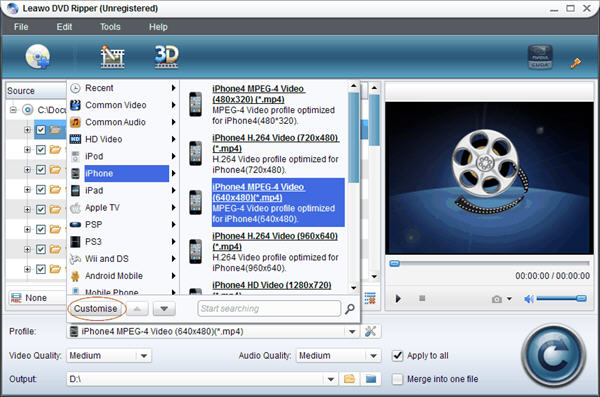
  • Set output file format.
  • Leawo DVD Ripper
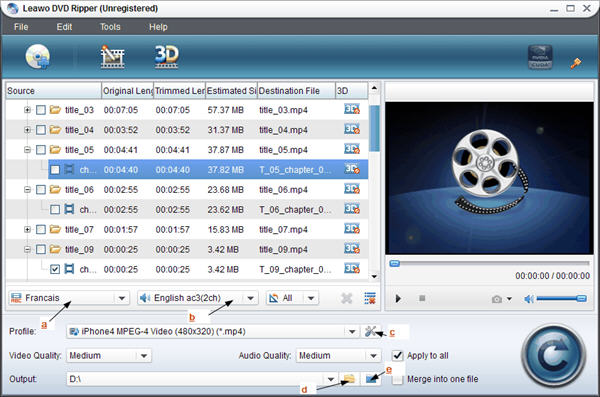
  • Set video size and video quality.
  • Leawo DVD Ripper
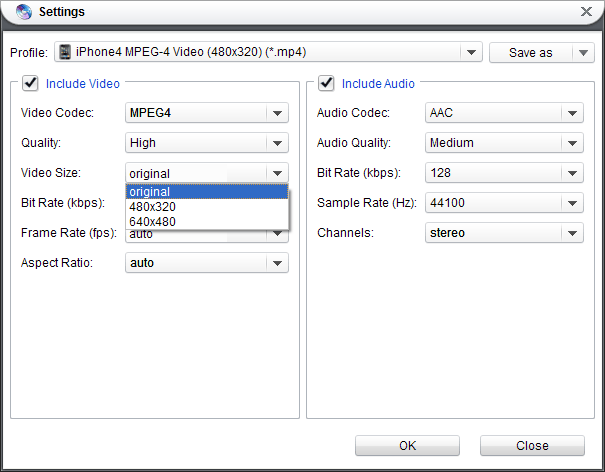
  • Set the video quality and video codec.
  • Leawo DVD Ripper
  • Click the convert button in low right corner to start the conversion.
  • Leawo DVD Ripper
Besides the basic function, Leawo DVD Ripper can also edit DVD, add watermark, convert 2D to 3D, merge files into one and setting DVD video effects, etc. If you have high requirements in DVD playback, have a try. You can refer to Leawo DVD Ripper user guide.

Related Articles:

Monday, September 10, 2012

2 FREE Methods of Playing FLV FLash Videos on Nexus 7

ASK

  • Why can't I play flash videos (flv) on Nexus 7?

Answer

nexus 7
Nexus 7 doesn't support FLV playback directly. The video formats are limited. But that doesn't mean there is no solution.

  • Method 1: FLV Player for Android
  • Since Nexus 7 runs Android 4.1, we can download and install apps from Google Play. There are many free FLV players you can find. Such as, FLV Video Player, VPlayer Video Player, Mobo Video Player Pro, FLV Player, and so on. Choose one of them, download and install on your Nexus 7. After loading your flv videos into the video players, you can enjoy your videos.
    Google Play
  • Method 2: Convert FLV
  • After looking for video players to play flv on Nexus 7, we can also convert flv to the video formats which Nexus 7 supports. Further more, the flv videos can be played on other devices more than Nexus 7. Leawo Free FLV Converter was born based on this problem. You can convert FLV videos to MP4 which Nexus 7 allows, AVI, WMV, MPEG, 3GP, and so on. The operating is easy, too.

    Step 1: Input FLV files into Leawo Free FLV Converter.
    Step 2. Set the output video format and output file path.
    Step 3. Start the conversion.

    flv on nexus 7

Hope this can help you!

Friday, September 7, 2012

What video formats could I play on Amazon Kindle Fire HD?

ASK

  • What video formats does Kindle Fire HD support?
  • Do you know all of Kindle Fire HD video formats?
  • I want to upload my videos to Kindle Fire HD. Please recommend a good Kindle Fire HD video converter. Thanks.

Answer

kindle fire hd
Amazon new tablets really provide users better display to play videos. Kindle Fire HD owns HD display. With polarizing filter and anti-glare technology, the 1280x800 HD display will give fans rich color and deep contrast from any viewing angle. Kindle Fire HD 8.9'' even has larger screen.

Kindle Fire HD video formats
According to its official technology specifics, Kindle Fire HD video format is MP4. Before playing videos on Kindle Fire HD, check your videos' formats first, please. If they are not in the Kindle Fire HD video formats list above, convert videos to Kindle Fire HD now.

Video to Kindle Fire HD
There are 2 video to Kindle Fire HD converters for you to choose - FREE MP4 Converter and Professional Video Converter. Under the help of the first video converter, you can convert videos in any popular formats to MP4, while the professional one provides conversions between all video formats. If you have high quality in video playback, the latter is better. Video Converter for Mac is also here.
Easy Interface of Free MP4 Converter

The video converters are easy to convert video to Kindle Fire HD. Load your original videos, choose the right output Kindle Fire HD video format, then click Converter to get what you want.

Glad to give advices. Hope it's helpful.

Tuesday, August 21, 2012

How can I play DVD on Acer Iconia Tab A110

ASK

  • As a gift, I will receive Acer Iconia Tab A110 from my parents. Could anyone tell me, if I can play DVD on Acer Iconia Tab A110, cause I want to watch DVD with my friends in my room.

Answer

Acer Iconia Tab A110

Acer Iconia Tab A110 will arrive in UK during September after Acer unveiled the Iconia Tab A110 in June at Computex in Taipei. Acer Iconia Tab A110 looks set to replace the Iconia Tab A100.

The latest 7-inch tablet from Acer owns Nvidia's quad-core Tegra 3 processor. 1GB of RAM and 8GB of internal storage are the normal configures in tablets. The solution of its screen is 1024x600. It runs Ice Cream Sandwich with front-facing camera when it was first released. Now, an Android 4.1 (Jelly Bean) update is confirmed.  In networking, it supports 802.11b/g/n WiFi and Bluetooth 3.0, and Acer says you should get around 7.5 hours of run time from the 12.65Whr battery.

If you are not satisfied with the original storage, the microSD slot allows you to add an additional 32GB. At the same time, with the HDMI outport, videos in this tablet can be played on more other devices, such as HDTV. The two features above are those the Nexus 7 lacks as Iconia Tab A110's competitor.

Acer Iconia Tab A110


Since the HDMI port isn't bidirectional, DVD player can't be transformed to Iconia Tab A110 and make the tablet a play device like TV. To play DVD on Acer Iconia Tab A110, the only way is converting DVD to file in the formats which A110 supports, like MPEG4. Here are two tools for you to choose - DVD Ripper for Win and DVD Ripper for MAC.

After all, all for these above cost Acer Iconia Tab A110 £179. Wait for your A110 life!

Tuesday, July 24, 2012

How can I Play with Lenovo IdeaTab S2109?

ASK

  • Can I play DVD on Lenovo IdeaTab S2109?
  • Is Lenovo IdeaTab S2109 able to connected with TV?
  • Does IdeaTab S2109 has HDMI port?

Answer

IdeaTab S2109 is a 9.7'' touchscreen tablet, released in 2012 by Lenovo. Low price attracts fans. But it still have latest hardware and software. The operating system is Android 4.0 update version, which has a refined and intuitive user interface. The 178° wide viewing angle is another point in this tablet. Actually it's important for people who wants to share fun with friends. 1.3MP front webcam for crystal-clear video chatting is supported by quad speakers which brings you superior surround-sound experience.


Lenovo IdeaTab S2109 performs good in connectivity: micro-USB port, microSD card reader and mini HDMI out for 1080p video playback on your TV. So, you are allowed to use HDMI outport to play the video from tablet on your TV. It's clearer than on tablet. The display of S2109 is only 9.7-inch with 1024 x 768 pixel.

At the same time, S2109 doesn't provide HDMI inport. So far, there isn't any tablet own this port. It doesn't matter. We can still play DVD on S2109 if you like to enjoy films by yourselves. Have you ever tried to rip video from DVD disc? Now, it's the right time to have a try. After converting DVD to video, like avi, mp4, flv, mov, wmv, it can be played on IdeaTab S2109 with video player smoothly, even on much more other tablets, phones and computers. In a word, it's a step brings more than one benefit to you.

That's all for the questions above. Transmission between S2109 and TV is not two-way. There isn't any in-port on it, so if you want to play DVD, the best way is make format conversion, first.

Play more on Lenovo IdeaTab S2109:

Wednesday, June 20, 2012

How to Play SWF on SamSung Galaxy Tab 2

ASK

  • How to Play SWF on SamSung Galaxy Tab 2 ?

Answer

SamSung Galaxy Tab 2
On the surface, the Samsung Galaxy Tab 2 7.0 appears to be little more than a low-key refresh of its six-month-old predecessor, the in-betweener Galaxy Tab 7.0 Plus. Admittedly, it is a fairly subtle refresh. But the Tab 2’s noticeably lower cost--at $250 (as of April 23, 2012), it represents a 38 percent drop in price from the 7.0 Plus--coupled with its numerous features gives it a clear advantage over the leading value-tablet competitors, the Amazon Kindle Fire and the Barnes and Noble Nook Tablet.

Adobe Flash Player on Samsung Galaxy Tab 2 is for online flash video playing. As to local swf files, such as flash games, it doesn't work. Please install an android swf player instead.

Play More on SamSung Galaxy Tab 2:

Tuesday, June 19, 2012

How to Play DVD on SamSung Galaxy Tab 2

ASK

  • How to Play DVD on SamSung Galaxy Tab 2?

Answer

SamSung Galaxy Tab 2
The Smart Remote app and built-in IR blaster turn the Galaxy Tab 2 into a universal remote control, allowing you to control all of your home entertainment devices, including your TV, cable box, DVR, and Blu-ray player. Additionally, the Smart Remote learns what you like and presents you with personalized recommendations. Find a show, click the "watch" button, and see your TV automatically switch to that show.

Using AllShare, Samsung's content-sharing service, you can wirelessly stream multimedia content from your tablet to your TV or another DLNA-enabled device. And if you need to leave the living room, you can stay tuned in--Smart View allows you to wireless stream what's on your Samsung Smart TV to your Galaxy Tab 2.

But there isn't any HDMI input port for you to play DVD on it. The best way is ripping dvd and play output video on this tablet. MP4, H.264 are both ok.

Play More on SamSung Galaxy Tab 2:

Monday, June 18, 2012

How to Play FLV Files on Asus Transformer Pad 300

ASK

  • How to Play FLV Files on Transformer Pad 300?

Answer

Asus Transformer Pad 300
After being mesmerized by the stunning displays found with the new iPad (3) and Asus Transformer Prime, we find ourselves just being content with the one on the Transformer Pad 300. Specifically, it features a 10.1” WXGA (1280 x 800) IPS display, which is actually the same one used by the original Eee Pad Transformer. By today’s standards, its resolution is common amongst 10-inch sized tablets – thus, allowing us to make out fine text with little issues. Moreover, since it’s an IPS panel that we’re talking about, it exhibits all the pleasing qualities we expect to find, like having good viewing angles, a high-contrast appearance, and neutral looking colors.

Transformer Pad 300 is good at playing videos depending on its screen. As to playing local flv files, flv players for android are needed. You can find many free flv players in android market. To get high quality, you can also convert flv to video and then play directly.

Play More on Asus Transformer Pad 300:

Friday, June 15, 2012

How to Play SWF Files on Asus Transformer Pad 300

ASK

  • How to Play SWF Files on Transformer Pad 300?

Answer

Asus Transformer Pad 300
The 10.1-inch display has a 1280 x 800 IPS panel, which did lack the punch and vibrancy of its competition. Colours were well represented, but the screen wasn’t as sharp as the new iPad or the Samsung Galaxy Tab 10.1, and it was extremely reflective.

The Asus Transformer Infinity 700 has a full 1080p screen, but this is one area the TF300T does fall down. When playing Temple Run and Riptide GP, and looking closely at HD content, blacks were distinctly blue, and noticeably noisy.

So, it will be great when looking through video websites and playing videos online on Transformer Pad 300. Install Adobe Flash before watching. As to local SWF files, Transformer Pad isn't able to play directly. There are many free swf players for android system. They will work. I recommend another way here when the swf players can't support perfectly - convert swf to video, keeping everything from orignal file. Sometimes swf players will lose something, then this method works.

Play More on Asus Transformer Pad 300:

Thursday, June 14, 2012

How to Play DVD on Asus Transformer Pad 300

ASK

  • How to Play DVD on Transformer Pad 300?

Answer

Asus Transformer Pad 300
This Ice Cream Sandwich sporting 10-inch tablet is powered by the latest Nvidia Tegra 3 chip, clocked at 1.2GHz, and weighs 637g, fractionally lighter than the new iPad.

The Transformer moniker comes from the familiar keyboard dock, which transforms the TF300T tablet into a netbook-hybrid, and this is included in the £399 price. The dock adds extra battery life to the tablet, taking life up to a quoted time of 12 hours.

If you’re wondering how Asus has managed to pack all the goodness of the Prime into the TF300T and keep price down, look to the build quality. The metal back has gone and been replaced by a flexible plastic panel, the keyboard is flimsy and the keys are noticeably less refined. However, to us, this matters not one jot.

Transformer has a HDMI output port, but no HDMI input port. So, if DVD disc is needed to play on it, ripping dvd to video is the first step. H.264 and MP4 are both video formats which can be played on this tablet.

Play More on Asus Transformer Pad 300:

Friday, May 11, 2012

How to Play DVD on Archos 101 G9 Turbo

ASK

  • How to Play DVD on Archos 101 G9 Turbo?

Answer

dvd on archos 101 g9 turbo
Archos 101 G9 Turbo is featuring a 1.2 TI OMAP dual-core processor and Android Honeycomb. With a 10.1″ 1280 x 800 resolution display and 16GB of internal storage you wont be missing any features from more expensive devices, although we only have 512MB of RAM on the Archos tablets instead of 1GB like the others. They also have a 1.5 GHz version in the works coming later this month but we are still awaiting more details on that front.

Like other popular tablets, Archos 101 G9 Turbo is also a good device to play videos on its largh size screen with not bad resolution. Since Archos 101 G9 Turbo only has output HDMI ports, dvd discs are unable to play on it directly. Don't worry, just rip dvd to video. AVI, MP4, MOV, 3GP, MPG, PS, TS, FLV, RM, RMVB, ASF are all avialable to be played on it.

Related Articles:

Thursday, May 10, 2012

How to Play FLV Flash Videos on ARCHOS 101 G9 Turbo

ASK

  • How to Play FLV Flash Videos on ARCHOS 101 G9 Turbo?

Answer

play flv on archos 101 g9 turboARCHOS 101 G9 Turbo is powered with 1.2 GHz OMAP processor with 512 MB of RAM, previously was 1GHz TI OMAP4 processor, 10.1 inch capacitive touchscreen display with 1280 x 800 pixel resolution, 16GB internal storage and microSD slot, 720p front facing camera, and runs on Android 3.2 OS Honeycom.

Don't worry about play flash videos while surfering on internet. Download flash player for android devices at the first time. As to local flv flash videos, FLV Player on android market will help you. For better quality, play them after being converted to video. ARCHOS 101 G9 Turbo supports MP4 files.

Related Articles:

Wednesday, May 9, 2012

How to Play SWF Flash on Archos 101 G9 Turbo

ASK

  • How to Play SWF Flash on Archos 101 G9 Turbo?

Answer

play swf on Archos 101 G9 Turbo
Archos 101 G9 Turbo edition gets its elongated title from the boosted 1.5Ghz dual-core processor. You'll find a plethora of ports: mini-HDMI, MicroUSB, MicroSD (unlabelled, and right below the MicroUSB port), a standard headphone port, and a plastic dummy peice that slides out to reveal a full-sized USB port. The front of the tablet is bare aside from a lot of grey bezel and a 720p front-facing camera, the only one on the device.

Based on running on android system, you are unlimited to download free apps from android market, such as swf player. With it, playing local swf flash videos on Archos 101 G9 Turbo won't be difficult any longer. For better presentation, convert swf files to common videos.

Related Articles:

Tuesday, May 8, 2012

How to View PowerPoint on Archos 101 G9 Turbo?

ASK

  • How to View PowerPoint on Archos 101 G9 Turbo?

Answer

PowerPoint on Archos 101 G9 Turbo
Archos 101 G9 Turbo measures 10.86 inches wide, 6.59 inches tall and 0.61 inches thick. The 10.1-inch touch-screen display has a resolution of 1,280x800 pixels, and can run 1080p full-HD video. One of the most exciting things about the Archos 101 G9 is the fact that it's upgradable, over the air, to Android 4.0, making this one of the few handsets to get a scoop of Ice Cream Sandwich so far.

There are many ways to view powerpoint on Archos 101 G9 Turbo. For showing presentation slide by slide, just save slides to images. For richer presentation, Document Viewer for android devices will help you. If you don't want to waste Archos 101 G9 Turbo screen's good benifit, convert powerpoint to video, keeping everything from original document, such as background music, embedded videos or other animations.

Related Articles: