Banner
Showing posts with label Apple. Show all posts

Thursday, January 17, 2013

Compares Among Top 3 iPad HD Wallpapers FREE Apps

Alice got a new iPad 4 last week, and I'm looking for some iPad wallpaper apps for her. There are actually many in App Store, and I picked up 3 of them, which are all FREE, easy to download and use.

Here they are - Wallpaper CASA (iPad version), Backgrounds HD and Cool Wallpapers HD & Retina Free. I decide to let Alice decide which one is OK. There are the detailed compares among the three ones. If you are wondering the same problem, download after read the tablet totally.

If you like, here is also another blog about iPad HD wallpapers - ipadwallpaper-show.blogspot.com.

NameWallpaper CASA (iPad version)Backgrounds HDCool Wallpapers HD & Retina Free
Icon
DeveloperBy NasthonBy StuckPixel, Inc.By Kappboom Inc.
PriceFREEFREEFREE
UpdatedJul 21, 2012Apr 19, 2012Nov 17, 2012
Size2.6 MB17.8 MB9.6 MB
LanguagesEnglish, Chinese, Czech, Dutch, French, German, Hebrew, Italian, Japanese, Korean, Portuguese, Russian, Spanish, TurkishEnglishEnglish, Chinese, Dutch, French, German, Italian, Japanese, Korean, Portuguese, Russian, Spanish, Swedish
Rated9+12+9+
DevicesiPad onlyiPad, iPhoneiPad, iPhone, iPod touch
DescriptionBrowse over 60,000 HD wallpapers in this app while sorting them by freshness and download times. You can know the exact size of each wallpapers. All of the HD images are categorized by 3 levels. The major ones are 3D/CG, Aircrafts, Animals, Anime Animated, Cars, Computers, Games, Holidays, Male celebrities, Motorcycles, Music, Nature, Sports, World and Travel and Others.It is available with thousands of high definition wallpapers. The wallpapers are categorized, and users are able to sort them by recency, popularity, or just by random. Easy and free to download wallpapers, customized fitted ones for each different device.It contains over 100,000 HD iPad wallpapers, which are categorized. It runs smoothly during your viewing. Maybe the beautiful flip animations are another reason makes you download it right now!
AdvantagesClear categories and easy to find what you want. The size is the smallest one. Multiple languages.It's just like a huge database, fulling with HD iPad wallpapers, which are bright and clear.This iPad wallpaper App has been downloaded most and rated most. Users can navigate fast through beautiful galleries one by one. Kindly and beautiful interface.
DisadvantagesLess sorted ways and less HD wallpapers than the other two. Single language and the biggest size of the three ones. Simple interface.The categories are not clear enough.

Friday, November 2, 2012

5 Popular Free Educational Apple Apps

iTunes U
Name: iTunes U
What is it? This is the best free education app currently available. It has frightening potential for such a simple idea, and will in all likelihood revolutionise how education even happens at university-level – but you don’t have to be a student to get tons of utility out of it.
Best for: iPad
Price: Free
Rated: 4+
Features: -Your students will experience the courses you build using the free iTunes U app for iPad. It’s a powerful app that lets students have all the materials for the course right at their fingertips.-iTunes U Course Manager is an easy-to-use and browser-based tool from Apple, which lets you create a complete course using all of your digital materials.
Link: http://www.apple.com/education/itunes-u/

Edmodo screenshot
Name: Edmodo
What is it? Edmodo makes it easy for teachers and students to stay connected and share information. Use your iOS device to send notes, submit assignments, post replies, and check messages and upcoming events while away from the classroom.
Best for: iPhone, iPod touch and iPad
Price: Free
Rated: 4+
Features: Teachers can post last-minute alerts to their students, keep tabs on recent assignment submissions, and grade assignments. Students can view and turn in assignments and check their latest grades. Class discussions can be conducted securely, both during and outside of school hours.
Link: http://www.apprevels.com/usa/app/edmodo/378352300

History Maps of the World screenshot
Name: History: Maps of the World
What is it? "History:Maps of World" is a fun and educational collection of high-resolution historical maps, including US, Europe, Americas, Africa, Asia, Middle East, Oceania, Thematic Mpas of World, etc.
Best for: iPhone, iPod touch and iPad
Price: Free
Rated: 4+
Features: - Wide variety of historical displays - Support for Category/Era view - Keyword Search - Displays the source about each map - Zoom in/out (zoom-in/out with pinch, zoom-in with double tab, and zoom-out with two-fingers tap) - Free screen rotation - Not require a network connection - I have a plans to add more features and maps.
Link: http://www.apprevels.com/usa/app/history-maps-of-world/303282377

Leafsnap
Name: Leafsnap
What is it? Leafsnap is the first in a series of electronic field guides being developed by researchers from Columbia University, the University of Maryland, and the Smithsonian Institution. This free mobile app uses visual recognition software to help identify tree species from photographs of their leaves.
Best for: iPhone, iPod touch and iPad
Price: Free
Rated: 4+
Features: Send notes; submit assignments; post replies; check messages and upcoming events while away from the classroom; teachers can post last-minute alerts to their students, keep tabs on recent assignment submissions, and grade assignments; students can view and turn in assignments and check their latest grades.
Link: http://www.apprevels.com/usa/app/leafsnap/430649829

Exoplanet screenshot
Name: Exoplanet
What is it? The Exoplanet app is a comprehensive visual database of all known exoplanets (planets orbiting other stars) discovered so far.
Best for: iPhone, iPod touch and iPad
Price: Free
Rated: 4+
Features: * Database with physical characteristics of every known exoplanet to date. * Interactive visualisations and animations. * Interactive 3D plot showing the location of all known exoplanets in our Milky Way. You can zoom into any planetary system. Explore how the night sky and the constellations look from the surface of other planets. Or zoom out and see local galaxy clusters and the cosmic microwave background. * Push notifications are sent out whenever a new planet is discovered (can be turned off at any time in the Settings App). * Augmented reality sky map: point the phone towards the sky to find an exoplanet! * Real images of all directly imaged exoplanets. * Interactive multi-touch correlation plots. * Twitter integration (requires iOS 5). * Extensive background information on exoplanets and detection methods. * Links to over 50,000 scientific publications (via NASA ADS). * Native support for Retina displays.
Link: http://www.apprevels.com/usa/app/exoplanet/327702034

Tuesday, October 16, 2012

How to Transfer iPod Music to PC

ASK

  • How can i transfer music from iPod to computer?
  • What is the best software to transfer iPod music back to a computer?
  • How can you transfer ipod touch music files to computer?
  • How do I transfer music from my ipod to my new itunes on my laptop?
  • How to transfer ipod music to itunes?
  • How do I transfer ipod music to itunes on another computer?

Answer

I collected many more or less similar questions on Yahoo Answer. Apple devices are widely used around the world, and the data transfer among devices gets more and more attention by people.

Being protected by copyright, iPod music pieces are not able to be transfered from iPod to PC or other iOS devices. And sometimes, it's inconvenient to make synchronization in iTunes, just for getting music from iPod.

Leawo iTransfer was born to solve these problems and make it easy to transfer data (eg. music, movie, app) from iOS devices to computer. You can finish transfer work fast on its kindly and simple interface.

1. Download Leawo iTransfer and make sure iTunes has been installed on your computer. Leawo iTransfer only runs on Windows systems.
Leawo iTransfer

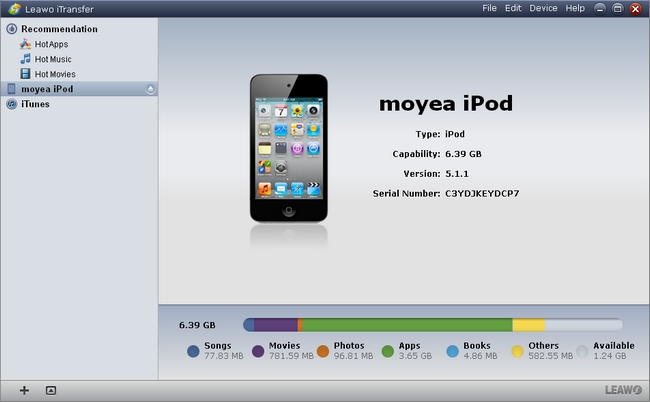
2. Connect your iPod with PC. Open Leawo iTransfer and your iPod will appear in the left list.
Leawo iTransfer interface

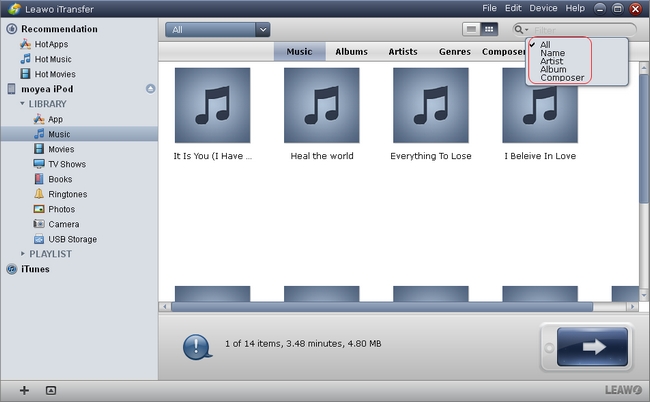
3. Select the taget music in your iPod.
Leawo iTransfer interface

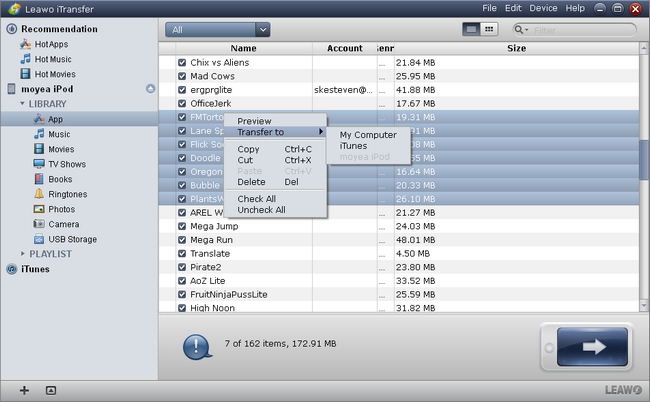
4. Transfer iPod music to PC. Just direct drag-and-drop, or right click, or use the transfer button in the lower right conner to do more setting during transfer. Set the taget device, and taget folder.
Leawo iTransfer interface

Leawo iTransfer interface

Leawo iTransfer can not only transfer music from iPod to computer, but also back up any type files among iOS devices, computer and iTunes without any limitation. The files are stored just like on a flash disk. With it, you can freely transfer any data.

Hope it is helpful!

Thursday, September 20, 2012

What video formats does iPod touch 5 support?

ASK

  • Though iPod Touch 5g hasn't been released, I will buy one. It's stronger than I thought. I think it's worthy to pay. But I want to know the video formats it can play on its 4-inch display. Any body help?

Answer

ipod touch 5
Apple launched a range of new devices on September 12th, including iPhone 5, iPod touch 5 and iPod nano 7. iPod touch 5 owns thinner and lighter body. It comes in colours, much funny than iPod touch 4. The 4-inch display is as large as iPhone 5, but one hand still rules the screen. The new Retina display got taller but now wider. A 5-megapixel iSight camera will capture pictures in your life and shoot 1080p HD video. iPod touch 5 becomes more and more excellent.

Like iPhone 5, iPod touch 5 can't play videos in any formats. Before uploading local videos to iPod touch 5, you have to check first.

Video Formats iPod Touch 5 supports
  • H.264 video up to 720p, 30 frames per second, Main Profile level 3.1 with AAC-LC audio up to 160 Kbps, 48kHz, stereo audio in .m4v, .mp4, and .mov file formats
  • MPEG-4 video up to 2.5 Mbps, 640 by 480 pixels, 30 frames per second, Simple Profile with AAC-LC audio up to 160 Kbps per channel, 48kHz, stereo audio in .m4v, .mp4, and .mov file formats
  • Motion JPEG (M-JPEG) up to 35 Mbps, 1280 by 720 pixels, 30 frames per second, audio in ulaw, PCM stereo audio in .avi file format

Convert Videos to iPod Touch 5
Besides the video formats mentioned above, other popular video formats, such as .avi, .mpeg, .wmv, are not able to be played on iPod Touch 5 directly. After uploading them to iPod Touch 5, it will display "unsupported file format". So, make conversions between them and iPod Touch 5 video formats.

MP4 Converter is a totally FREE tool which converts almost all of the popular video formats to mp4. It provides kindly interface and easy operating steps. Parameters are allowed to be set, such as encoded types (H.264, MPEG-4).
mp4 converter


More about iPhone 5 and iPod Touch 5:
More iPhone Wallpapers:

Wednesday, August 29, 2012

Play Video and DVD on iPhone 5 with Improved Display

iphone 5
The releasing day of iPhone 5 is coming near and near. The date is almost sure now, September 12, according to many information and news. Though there isn't any official images of this expecting device, we have already talked about it for a long time. The first look is very important to everyone, such as the size, the  thickness, the screen and the integral design.

This article collects believable informations about iPhone 5's display.

iPhone 5 Display
As a tradition, iPhone always has a 3.5'' display, from the first generation to iPhone 4s. This time, Apple appears to make something different. To match an industry-wide movement, the display will be larger, and is expected to adopt a 4'' screen with 640x1136 resolution for iPhone 5.

iPhone 5 Display New Technology : In-cell Touch
iPhone 5 is expected to use a new display tech called IN-CELL TOUCH. In-cell multitouch technology integrates touch into the thin-film transistor LCD manufacturing process, obviating the need for additional sensors and glass.In-cell touch is going to be incorporated with LTPS TFT LCD on the new Apple device.

It is an improvement over the current technique, which places the touch sensors on top of the screen and naturally leads to a thicker display. This reduces the space taken up by the screen and the weight of the device.

This technology would be one of the greatest benefits to the iPhone 5.

iPhone 5 Display Supplier
The latest rumor pointed that LG Display will provide iPhone 5's displays to Apple. The chief executive of LG Display said, "We just began mass production and we don't expect any disruption in supplies".

In previous rumors, Sharp is reported as the display provider of iPhone 5. More, Sharp's IGZO technology was said to be the new technology which iPhone 5 display will base on. In April, Sharp announced that they intended to use IGZO technology in mobile devices.

Compared with the other two display providers, Sharp and Toshiba, LG Display is principal display supplier for Apple's exsisting products, such as iPad and iPhone.

Play Video and DVD on iPhone 5
Based on larger and better benifit display screen, users must get greater experience during their entertainment life with iPhone 5. In previous iPhone series, they support playing H.264 and MPEG-4 videos in .m4v, .mp4 and .mov file formats. Before playing local video files, check the formats first. If the converision is needed between video formats, these video converters are FREE for you.

As we know, iPhone is not able to play DVD direclty, since there isn't any in-port for DVD players. Compared with iPhone, iPad may be a better choice to enjoy DVD films. Finally, if you want to play DVD on iPhone 5, after ripping videos from DVD discs, play videos normally instead.