Banner
Showing posts with label Video QA. Show all posts

Monday, January 14, 2013

Video Formats Samsung Galaxy Camera Supports

ASK

  • What video formats does Samsung Galaxy Camera GC100 support?

Answer

samsung galaxy camera
Samsung Galaxy Camera is the first camera running Android os. It was released on August 29, 2012.

Samsung Galaxy Camera OS
The Samsung GALAXY Camera gives you the magic of professional digital photography with the powerful intelligence of the Android 4.1 Jelly Bean™ OS. It supports all Samsung Apps.

Samsung Galaxy Camera
GC100 has perfect camera with 16-megapixel resolution. Save the digital zoom for editing afterwards. GALAXY Camera’s 21x Super Long Zoom is 100 percent optical, helping you get as close as possible to your subject and while maintaining the same crystal clear image sharpness you experience with subjects nearer to the camera. Samsung also add a slow motion video recording function in this Android camera.

Samsung Galaxy Camera Video Formats
Galaxy Camera supports playing videos in AVI, MP4/3GP, WMV, FLV, MKV, WEBM and full HD (1080p) Video recording & playback.

When recording, you can choose the movie size among 1920 x 1080 (30fps), 1280 x 720 (60fps), 1280 x 720 (30fps), 640 x 480 (60fps), 640 x 480 (30fps), 320 x 240 (30fps) and Slow Motion Video WVGA: 768 x 512 (120fps). Many types of effects can be used,including Normal, Vintage, Black & White, Autumn Brown, Negative, Nostalgia, Color Fade, Retro, Sunshine, Old Photo, Comic, Pastel Sketch, Gothic Noir, and Impressionist.

If you wanna more output video formats or play more videos on it, Leawo Video Converter series will satisfy your requirements. You can find FREE video converters, Professional video converter and HD video converter.

Price of Samsung Galaxy Camera GC100
In India, the price of Galaxy Camera is set to be Rs.29900, equals to $550.16. The price in US hasn't been announced yet. Many rumors said, it would be at least $499.

Monday, September 24, 2012

The First Two Windows 8 Phones: HTC Windows Phone 8X vs. HTC Windows Phone 8S

HTC Windows Phone 8X vs. HTC Windows Phone 8S
HTC announced the first two windows phones, HTC Windows Phone 8X and HTC Windows Phone 8S last week. Though they came to the word at the same time, there are still some differences between the two windows phones.

HTC Windows Phone 8X vs. HTC Windows Phone 8S
SpecsHTC Windows Phone 8XHTC Windows Phone 8S
Size132.35 x 66.2 x 10.12 mm120.5 x 63 x 10.28 mm
Weight130 grams with battery113 grams with battery
Display4.3 inch touch screen with Gorilla® Glass 24 inch super LCD touch screen
ResolutionHD 720pWVGA resolution
CPUQualcomm® S4 1.5 GHz, Dual-coreQualcomm® S4 1 GHz, Dual-core
MemoryTotal storage: 16 GB, available capacity varies
RAM: 1GB
Total storage: 4 GB, available capacity varies
Expansion SD card slot supports micro™ SD memory card for additional storage (card not included)
RAM: 512 MB
Connectivity3.5 mm stereo audio jack
NFC capable
Bluetooth 2.1+EDR
Wi-Fi®: IEEE 802.11 a/b/g/n
3.5 mm stereo audio jack
Bluetooth® 2.1+EDR
Wi-Fi®: IEEE 802.11 b/g/n
BatteryEmbedded & rechargeable Li-ion Polymer battery
Capacity: 1800 mAh
Embeded & rechargeable Li-ion Polymer battery
Capacity: 1700 mAh

MultiMedia Playback
Both HTC Windows Phone 8X and HTC Windows Phone 8S are able to play the audio and video formats in the list below:
  • Audio: .aac, .amr, .m4a, .mp3, .wav, .asf, .wma (verison 9 and 10)
  • Video: .3gp, .3g2, .mp4, m4v, asf, .wmv (version 9 and 10)
  • Recording: .wav and .mp4
These two windows phones really support in playback better. As to the single recording formats, these free video converters will help you make conversions so that you can play them on more devices and share on more websites.

Camera
The HTC Windows Phone 8X features an 8-megapixel primary camera with autofocus, LED flash, geo-tagging, touch focus and 1080P video capture with continuous autofocus and video lighting, while the HTC Windows Phone 8S sports a 5-megapixel primary camera which also offers autofocus, LED flash, geo-tagging, touch focus and face detection, along with 720P video capture.

HTC always bring us a colorful world, and this time it does too. The different cover colors are waiting for you to select. If you are tired of Android and iOS phones, HTC windows 8 may be your next choice.

Thursday, September 20, 2012

What video formats does iPod touch 5 support?

ASK

  • Though iPod Touch 5g hasn't been released, I will buy one. It's stronger than I thought. I think it's worthy to pay. But I want to know the video formats it can play on its 4-inch display. Any body help?

Answer

ipod touch 5
Apple launched a range of new devices on September 12th, including iPhone 5, iPod touch 5 and iPod nano 7. iPod touch 5 owns thinner and lighter body. It comes in colours, much funny than iPod touch 4. The 4-inch display is as large as iPhone 5, but one hand still rules the screen. The new Retina display got taller but now wider. A 5-megapixel iSight camera will capture pictures in your life and shoot 1080p HD video. iPod touch 5 becomes more and more excellent.

Like iPhone 5, iPod touch 5 can't play videos in any formats. Before uploading local videos to iPod touch 5, you have to check first.

Video Formats iPod Touch 5 supports
  • H.264 video up to 720p, 30 frames per second, Main Profile level 3.1 with AAC-LC audio up to 160 Kbps, 48kHz, stereo audio in .m4v, .mp4, and .mov file formats
  • MPEG-4 video up to 2.5 Mbps, 640 by 480 pixels, 30 frames per second, Simple Profile with AAC-LC audio up to 160 Kbps per channel, 48kHz, stereo audio in .m4v, .mp4, and .mov file formats
  • Motion JPEG (M-JPEG) up to 35 Mbps, 1280 by 720 pixels, 30 frames per second, audio in ulaw, PCM stereo audio in .avi file format

Convert Videos to iPod Touch 5
Besides the video formats mentioned above, other popular video formats, such as .avi, .mpeg, .wmv, are not able to be played on iPod Touch 5 directly. After uploading them to iPod Touch 5, it will display "unsupported file format". So, make conversions between them and iPod Touch 5 video formats.

MP4 Converter is a totally FREE tool which converts almost all of the popular video formats to mp4. It provides kindly interface and easy operating steps. Parameters are allowed to be set, such as encoded types (H.264, MPEG-4).
mp4 converter


More about iPhone 5 and iPod Touch 5:
More iPhone Wallpapers:

Monday, September 10, 2012

2 FREE Methods of Playing FLV FLash Videos on Nexus 7

ASK

  • Why can't I play flash videos (flv) on Nexus 7?

Answer

nexus 7
Nexus 7 doesn't support FLV playback directly. The video formats are limited. But that doesn't mean there is no solution.

  • Method 1: FLV Player for Android
  • Since Nexus 7 runs Android 4.1, we can download and install apps from Google Play. There are many free FLV players you can find. Such as, FLV Video Player, VPlayer Video Player, Mobo Video Player Pro, FLV Player, and so on. Choose one of them, download and install on your Nexus 7. After loading your flv videos into the video players, you can enjoy your videos.
    Google Play
  • Method 2: Convert FLV
  • After looking for video players to play flv on Nexus 7, we can also convert flv to the video formats which Nexus 7 supports. Further more, the flv videos can be played on other devices more than Nexus 7. Leawo Free FLV Converter was born based on this problem. You can convert FLV videos to MP4 which Nexus 7 allows, AVI, WMV, MPEG, 3GP, and so on. The operating is easy, too.

    Step 1: Input FLV files into Leawo Free FLV Converter.
    Step 2. Set the output video format and output file path.
    Step 3. Start the conversion.

    flv on nexus 7

Hope this can help you!

Friday, September 7, 2012

What video formats could I play on Amazon Kindle Fire HD?

ASK

  • What video formats does Kindle Fire HD support?
  • Do you know all of Kindle Fire HD video formats?
  • I want to upload my videos to Kindle Fire HD. Please recommend a good Kindle Fire HD video converter. Thanks.

Answer

kindle fire hd
Amazon new tablets really provide users better display to play videos. Kindle Fire HD owns HD display. With polarizing filter and anti-glare technology, the 1280x800 HD display will give fans rich color and deep contrast from any viewing angle. Kindle Fire HD 8.9'' even has larger screen.

Kindle Fire HD video formats
According to its official technology specifics, Kindle Fire HD video format is MP4. Before playing videos on Kindle Fire HD, check your videos' formats first, please. If they are not in the Kindle Fire HD video formats list above, convert videos to Kindle Fire HD now.

Video to Kindle Fire HD
There are 2 video to Kindle Fire HD converters for you to choose - FREE MP4 Converter and Professional Video Converter. Under the help of the first video converter, you can convert videos in any popular formats to MP4, while the professional one provides conversions between all video formats. If you have high quality in video playback, the latter is better. Video Converter for Mac is also here.
Easy Interface of Free MP4 Converter

The video converters are easy to convert video to Kindle Fire HD. Load your original videos, choose the right output Kindle Fire HD video format, then click Converter to get what you want.

Glad to give advices. Hope it's helpful.

Wednesday, September 5, 2012

Convert Samsung Galaxy Camera Videos

ASK

  • I want Samsung Galaxy Camera as a gift. But I wonder if I can play videos on it, cause I heard that it doesn't support all of the video formats.

Answer

samsung galaxy camera
Samsung Galaxy Camera was released together with ATVI series by Samsung.

This new camera will not only boast the speed and smooth operation of the latest android platform, Android 4.1, but also owns both WiFi and either 3G or 4G connectivity. It shares most of its key specifications with Galaxy SIIIsmartphone, such as a 1.4GHz quad-core processor at its heart, missing only the ability to make calls.

As for photo-taking capabilities, the Samsung Galaxy Camera provides a 16.3-megapixel BSI CMOS sensor, a 21x f/2.8 lens that delivers 23mm-483mm equivalent range, optical image stabilization, Full HD 1080p video (30fps) and a nearly 4.8-inch LCD Super Clear Touch Display.

As to video recording, it captures your most precious memories at an amazing 120 frames per second and 720x480 resolution, and it plays them back slowly in magical, crystal clear video, making your memories truly timeless.

Samsung Galaxy Gamera supports MP4, H.264 and MPEG. If you want to make conversions of the videos to play them on this android camera, you need a video converter. MP4 is really a common video format in almost every occasion. Then, this FREE MP4 Converter will be one of your choices, I think. Only several steps need to be done.
video to samsung galaxy camera

Hope it is helpful.

Wednesday, August 29, 2012

Play Video and DVD on iPhone 5 with Improved Display

iphone 5
The releasing day of iPhone 5 is coming near and near. The date is almost sure now, September 12, according to many information and news. Though there isn't any official images of this expecting device, we have already talked about it for a long time. The first look is very important to everyone, such as the size, the  thickness, the screen and the integral design.

This article collects believable informations about iPhone 5's display.

iPhone 5 Display
As a tradition, iPhone always has a 3.5'' display, from the first generation to iPhone 4s. This time, Apple appears to make something different. To match an industry-wide movement, the display will be larger, and is expected to adopt a 4'' screen with 640x1136 resolution for iPhone 5.

iPhone 5 Display New Technology : In-cell Touch
iPhone 5 is expected to use a new display tech called IN-CELL TOUCH. In-cell multitouch technology integrates touch into the thin-film transistor LCD manufacturing process, obviating the need for additional sensors and glass.In-cell touch is going to be incorporated with LTPS TFT LCD on the new Apple device.

It is an improvement over the current technique, which places the touch sensors on top of the screen and naturally leads to a thicker display. This reduces the space taken up by the screen and the weight of the device.

This technology would be one of the greatest benefits to the iPhone 5.

iPhone 5 Display Supplier
The latest rumor pointed that LG Display will provide iPhone 5's displays to Apple. The chief executive of LG Display said, "We just began mass production and we don't expect any disruption in supplies".

In previous rumors, Sharp is reported as the display provider of iPhone 5. More, Sharp's IGZO technology was said to be the new technology which iPhone 5 display will base on. In April, Sharp announced that they intended to use IGZO technology in mobile devices.

Compared with the other two display providers, Sharp and Toshiba, LG Display is principal display supplier for Apple's exsisting products, such as iPad and iPhone.

Play Video and DVD on iPhone 5
Based on larger and better benifit display screen, users must get greater experience during their entertainment life with iPhone 5. In previous iPhone series, they support playing H.264 and MPEG-4 videos in .m4v, .mp4 and .mov file formats. Before playing local video files, check the formats first. If the converision is needed between video formats, these video converters are FREE for you.

As we know, iPhone is not able to play DVD direclty, since there isn't any in-port for DVD players. Compared with iPhone, iPad may be a better choice to enjoy DVD films. Finally, if you want to play DVD on iPhone 5, after ripping videos from DVD discs, play videos normally instead.

Thursday, August 23, 2012

Best Video Solution for The New Android Camera - Nikon COOLPIX S800C

nikon coolpix s800c
nikon coolpix s800c
nikon coolpix s800c
nikon coolpix s800c
Nikon announced the first camera using Android operating system - Nikon COOLPIX S800c on August 22, 2012. Until now, thanks to this smart camera, the gulf between smartphones and cameras is getting smaller.

As an Android smart device, Coolpix S800c has all the capabilities which other Android devices have. Users are allowed to use Google services. If you are in the mood, just play Angry Birds on the S800c if the battery limits. With built-in WiFi, beautiful images and recording videos can be confidently and quickly shared with friends and family, such as be uploaded to various social networks or other cloud services.

As a camera, Coolpix S800c really has strong abilities. It owns the wide and bright 3.5-inch touchscreen OLED monitor with resolutions of 1920 x 1080 (30 fps), 1280 x 720 (30 fps), and 640 x 480 (30 fps). You can not only shoot beaufitul 16.0 megapixel photos, but also Full HD videos, even in low light conditions. The optical 10x zoom NIKKOR lens covers from wide-angle 25-250mm, so either the largest group or action from afar is captured with clarity. For maximum creativity, the S800c has 18 filter effects, including the new Toy Camera effect, Pop and Super Vivid color filters, as well as Cross Process and Peripheral Darkening filters. USB and HDMI ports are also necessary in digital cameras. The storage included is 1.7GB.

The video format which Coolpix S800c only supports is MOV in MPEG-4 AVC/H.264. So, if you want to play videos on Coolpix S800c from sdcard or convert Coolpix S800c videos to more other formats, a video converter is enough.

It's interesting that the camera part of the S800c can run independently from Android while the operating system is still booting up. Rather than letting the camera stay on standby like most other Android devices, it uses a shut-down timer that activates once Android goes on standby. It means, when the camera's completely switched off, you will go straight into camera mode after hitting the power button. Then the interface goes back to smart mode after half a minute.

Additional, there is also built-in GPS in the smart device. It enables recording of shooting location information on stills and movies.

Nikon Coolplix S800c will arrive in US at $350 and UK at £379.

Wednesday, August 8, 2012

Convert London 2012 Olympics DV-Recording Videos to Youtube Videos

dv ASK

  • I'm a london girl and I'm happy that Olympics is held in my city. I have use my dv and recorded many matches of my favorite basketball team in london olympics 2012. So how can i convert london olympics 2012 videos to iyoutube format? What do i need to convert london olympics 2012 dv-recording videos and uploat to youtube? Anyone knows?

Answer

London 2012 Olympic Games has already passed more than a half. I'm sure that many of you have record the meaningful videos by yourselves, maybe with TV Record Software on PC or DVs. And at the same time, most of you do want to share the recording videos on Youtube with others.
youtube logo
As we know, Youtube.com only supports several video formats:
  • WebM files - Vp8 video codec and Vorbis Audio codecs 
  • .MPEG4, 3GPP and MOV files - Typically supporting h264, mpeg4 video codecs, and AAC audio codec 
  • .AVI - Many cameras output this format - typically the video codec is MJPEG and audio is PCM 
  • .MPEGPS - Typically supporting MPEG2 video codec and MP2 audio 
  • .WMV 
  • .FLV - Adobe-FLV1 video codec, MP3 audio

Different DV use different video formats. The most popular ones, such as AVCHD (.mts, .m2ts), .dv, .mod, and .tod are not in the list above. So, we need to make conversion first before uploading them to Youtube.

What we need:
  • A professional video converter
Nowadays, finding a video converter on internet is not a hard thing. But notice if they support converting dv-recording video formats or not. Here is a free Video4Web converter, which can convert most part of video formats to popular video formats always used for web, such as .flv. After several steps, you will get what you want.

Step 1: Add dv-recording videos into Video4Web Converter
video4web
Step2: Choose the output video format
video4web
Step 3: Simple editing and setting. Video sharing websites always have time limited, and here you can crop videos.
video4webvideo4web
Step 4: Convert and wait for the output videos
video4web

Finally, upload your recording videos to Youtube or show them on devices, such as iPad, iPhone, Galaxy Note and others.

Wednesday, August 1, 2012

Record Olympic TV Shows with Most Popular TV Shows Record Software on PC

For those who are busy in business, Olympics matches are not allowed to watch live on time. If you are also a sport fans but the time is limited, the most popular TV Shows Recorders in this article are helpful during London 2012 Olympic Games. You don't need to buy DVR, instead, software on computers is enough. After recording, you can also play tv shows on more devices.

Prepare

  • TV Signal. First, we need a tv signal source into our computers. Both TV antenna and cable TV jack are OK. Also, you can get television into computers through satellite by USB tuner.

Windows Media Center
Windows Media Center is developed by Microsoft. With it, users can record live TV shows and movies directly onto your computer. You are allowed to do setting during recording. Things you need: 1. A TV tuner (a device that connects to your computer through an internal expansion slot or an external expansion port). 2. A TV signal source (such as from a TV antenna or a cable TV jack). There are detailed tv shows recording steps for users to refer to.
Windows Media Center

NextPVR
NextPVR is a free Personal Video Recorder (PVR) and Media Centre application for Microsoft Windows, developed by Sub. The new name, NextPVR, is shorten from GB-PVR. You can watch (and pause) live TV and schedule your favourite shows for later viewing. By the way, tt's more humanized than Windows Media Center. Such as change the look and feel of NextPVR with the supported skins, weather, internet radio and RSS Reader.
NextPVR

Beyond TV
Beyond TV is digital video recorder/media center software for Microsoft Windows produced by the American company SnapStream originally released in 2000 as Personal Video Station. It has functions similar to Windows Media Center. Its simple user-friendly interface lets you browse your TV listings, record shows, and watch live TV. Follow the steps on How Beyond TV Works.
Beyond TV

SageTV
SageTV is an application that will allow you to record, pause, and watch live TV. You can schedule shows or movies to record in advance, and like Windows Media Center, SageTV lets you view pictures, watch DVDs, and play music.
SageTV

Notice
  • Large hard drive space. Recording television, specifically high definition television, takes up a LOT of hard drive space. A few gigabytes per hour. If you will be doing a lot of recording, make sure you have a decent amount of hard drive space, at least 500GB.
  • Strong computer processor and graphics card to watch while recording tv shows. Or you will see performance suffer and the television may stutter.

Tuesday, July 31, 2012

How to convert Olympics match videos in DVR-MS recorded by Windows Media Center to popular video formats

ASK

  • How to Convert EURO 2012 Videos to Samsung Galaxy S3? I have no time to watch the live olympics matches. So i tell my firend to help me record it. And i will convert the euro video on my tablets to watch. But How can I convert london olympics 2012 video to mp4? Should i need a Third-Party Software?
  • I recorded Olympics basketball matches with Windows Media Center. But I can't play the DVR-MS files on my mobile phone, so that I can watch it on my way to work. Is there any way to convert DVR-MS to phone video?

Answer

Windows Media Center

Windows Media Center is a digital video recorder and media player developed by Microsoft.

No matter which version do you use, Windows XP Media Center Edition, Windows Vista Home Premium and Ultimate, or editions of Windows 7 except for Starter and Home Basic, Windows Media Center provides the same functions. It can not only organize and play multimedia files, but also view and record live television.

It is possible to watch and pause live TV with support for up to four TV tuners or two dual-tuner cards (a maximum of two tuners outside of the United States). With Windows Media Center, you can also record live TV shows and movies directly onto your computer, even schedule a recording in advance or automatically record new episodes of your favorite TV series. The video and audio file container format is DVR-MS used in Windows XP Media Center Edition, and WTV in Windows Media Center TV Pack 2008 and all Windows Media Center editions of Windows 7.

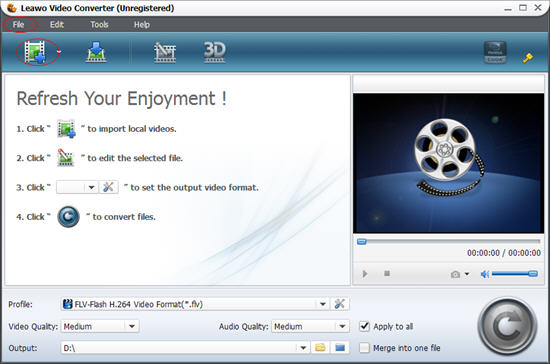
To convert .dvr-ms to popular video formats, this professional Video Converter will help you. It supports conversations between DVR-MS, AVI, MPEG, WMV, MP4, FLV, RM, MOV, Xvid, 3GP, and etc. Easy and kindly interface is its another advantage. Just several steps, you will get mp4 files converted from dvr-ms.

leawo video converter screenshot

Before playing videos on mobile phones, you need to check what video formats are available on your devices. Then, set the output video and audio parameters to get the right video at once.

Here is a detailed guide of converting dvr-ms to mp4 for users to refer to. Hope that it is helpful. Enjoy London 2012 Olympics anywhere at anytime!

Tuesday, July 24, 2012

How can I Play with Lenovo IdeaTab S2109?

ASK

  • Can I play DVD on Lenovo IdeaTab S2109?
  • Is Lenovo IdeaTab S2109 able to connected with TV?
  • Does IdeaTab S2109 has HDMI port?

Answer

IdeaTab S2109 is a 9.7'' touchscreen tablet, released in 2012 by Lenovo. Low price attracts fans. But it still have latest hardware and software. The operating system is Android 4.0 update version, which has a refined and intuitive user interface. The 178° wide viewing angle is another point in this tablet. Actually it's important for people who wants to share fun with friends. 1.3MP front webcam for crystal-clear video chatting is supported by quad speakers which brings you superior surround-sound experience.


Lenovo IdeaTab S2109 performs good in connectivity: micro-USB port, microSD card reader and mini HDMI out for 1080p video playback on your TV. So, you are allowed to use HDMI outport to play the video from tablet on your TV. It's clearer than on tablet. The display of S2109 is only 9.7-inch with 1024 x 768 pixel.

At the same time, S2109 doesn't provide HDMI inport. So far, there isn't any tablet own this port. It doesn't matter. We can still play DVD on S2109 if you like to enjoy films by yourselves. Have you ever tried to rip video from DVD disc? Now, it's the right time to have a try. After converting DVD to video, like avi, mp4, flv, mov, wmv, it can be played on IdeaTab S2109 with video player smoothly, even on much more other tablets, phones and computers. In a word, it's a step brings more than one benefit to you.

That's all for the questions above. Transmission between S2109 and TV is not two-way. There isn't any in-port on it, so if you want to play DVD, the best way is make format conversion, first.

Play more on Lenovo IdeaTab S2109:

Friday, July 20, 2012

How to Convert Panasonic LUMIX Digital Camera Videos to Popular Videos

panasonic lumix logo
LUMIX is well known by the world as Panasonic's brand of digital cameras from 2001. It ranges from pocket point-and-shoot models to digital SLRs. Beginning with compact digital camera DMC-LC5 and DMC-F7, Lumix series has already released multiple digital cameras including DSLM (Digital Single Lens Mirrorless) and compact ones.

In September 2011, Panasonic showed a 3D Lumix camera prototype. It is said that the 3D camera would have twin 4x zoom lenses with folding optics and optical image stabilization for both video and still images.
panasonic lumix digital cameras
LUMIX cameras come in several colours in some models for young people, such as black, silver, blue, red, and white. Different price level cameras have different sensors. There are many choices for users to choose.

Besides excellent image capture function, LUMIX cameras also can be used to record videos. High-end devices even offer HD video functions, including the AVCHD videos. AVCHD videos are always saved in .mts and .m2ts. Though they are HD videos, their formats are not common in our daily life. You need special players to play them and they are not supported formats of video sharing websites, such as Youtube. To make them spread widely on internet, the best way is converting AVCHD  to popular video formats. Leawo Video Converter makes conversion between video formats, eg. convert .m2ts to avi, .m2ts to mp4, .m2ts to .flv, and .mts to .mov. Sharing recorded videos on websites is no longer a difficult thing. Besides HD videos, other common captured videos are able to convert freely for any reasons with simple video editing function.

leawo video converter screenshot

In addition, Panasonic has been an Official Worldwide Olympic Partner for more than 20 Years in the Audio and Visual Equipment Category. For sports fans, it's also another way to keep your memories by saving recorded videos by yourselves.

Have a nice day with Panasonic LUMIX digital cameras!

Thursday, May 31, 2012

Can I Play DVD on LG Optimus 3D Max

ASK

  • Can I Play DVD on LG Optimus 3D Max?

Answer

LG Optimus 3D Max
While LG Optimus 3D Max doesn’t have any huge changes over the original Optimus 3D (aka LG Thrill 4G for AT&T) it does look like a pretty solid phone, especially if the 3D feature is of any interest to you. The new 3D Max is faster, thinner, and lighter than the original. While it had a dual-core processor the new 3D Max comes with a faster 1.2 GHz dual-core chip – although we aren’t sure if that is a Qualcomm or another Texas Instruments OMAP 4. The phone still features a 4.3″ screen with a low 480 x 800 resolution, but it does offer stereoscopic glasses-free 3D video and picture viewing, not to mention LG’s own 3D UI and games tailored to use the 3D effects. According to the FCC filing it will be using AT&T’s 3G and HSPA+ 4G speeds, with no mention of LTE so that wasn’t good news, but things could change before a release date.

Playing videos on this 3D smartphone is enjoyable, I think. Though it doesn't have port to play DVD disc, we can still finish that in another way - ripping video from dvd.

Tuesday, May 29, 2012

How to insert Canon Vixia HF M400 videos into PowerPoint

ASK

  • How to insert Canon Vixia HF M400 videos into PowerPoint?

Answer

Canon Vixia HF M400
The Canon VIXIA HF M400 Flash Memory Camcorder features dual SDXC-compatible memory card slots in an ultra-sleek, compact and lightweight body, convenience and capability wrapped in one package. Canon's leading imaging technologies, including a Genuine Canon 10x HD Video Lens and new HD CMOS Pro Image Sensor deliver high video resolution, outstanding low-light performance, and a wide dynamic range. Sophisticated features such as Smart Auto "read" the visual components of the scene you're shooting and chooses the best settings. Touch & Track allows you to achieve sharp focus and precise exposure for any subject, simply by touching the 3.0" Touch Panel LCD. New features such as Cinema-Look Filters, Story Creator, and Touch Decoration provide an easy and fun way to shoot great video and add creative flair. And a new high-quality internal microphone allows your audio to match the breathtaking realism of your video.

Nowadays, many video players support playing HD videos, just like Vixia HF M400 records. If you want to add the videos into a powerpoint presentation, a step needs to be done - converting AVCHD  videos to .avi, .mpg or .mpeg, .wmv files to add into powerpoint. Then, follow the steps on How to Insert Local Video into PowerPoint 2010, 2007, 2003?

Friday, May 25, 2012

How to Upload Canon Vixia HF M400 Videos to Youtube

ASK

  • How to Upload Canon Vixia HF M400 Videos to Youtube?

Answer

Canon Vixia HF M400
The Vixia HF M400 uses the full AVCHD format for 1920 x 1080p high definition recording. It supports 24Mbps bit rate recording, the highest data-rate available in the AVCHD video format. It uses the same HD CMOS Pro image sensor found on the $1,500 HF G10 (and the $599 M40). According to Canon, this high-end sensor delivers much better low light performance and a much wider color gamut than traditional consumer-grade camcorder sensors. It does so, in part, because it uses fewer pixels that are larger in size and thus more sensitive to light. That's why the sensor has a resolution of 2-megapixels (so don't let the lower resolution figure scare you - less, in this case, is more).

There is a "Smart Auto" mode to automatically optimize your video exposure based on your shooting environment. You can also snap 2-megapixel still photos with the M400. There is a flash as well, which can aid in low light photography and keeping images crisp.

Since Youtube.com doesn't support AVCHD digital video format, including mts and m2ts, a m2ts to youtube converter is needed. After importing AVCHD videos to it, choose youtube video in output option.

Thursday, May 24, 2012

How to Insert Canon VIXIA HV30 Videos into PowerPoint

ASK

  • How to Insert Canon VIXIA HV30 Videos into PowerPoint?

Answer

Canon VIXIA HV30
Canon’s new MiniDV-based Vixia HV30 is a slight upgrade from the HV20, adding a 30p progressive shooting mode and compatibility for the company’s new high-capacity batteries. At 1.2 pounds, the camera build is rugged and easy to use, but it's also a bit bulky. More important, the HV30 boasts the same 3-megapixel CMOS sensor as the HV20, which means this model shoots excellent video.

Vixia HV30 saves recording videos as HDV files. But .hdv isn't compatible with PowerPoint. Then, follow the steps on How to Insert Local Video into PowerPoint to add videos to powerpoint successfully.

Related Articles:

Wednesday, May 23, 2012

How to Upload Canon Vixia HV30 Videos to Youtube

ASK

  • How to Upload Canon Vixia HV30 Videos to Youtube?

Answer

Canon Vixia HV30
The dramatic Canon VIXIA HV30 is the latest in Canon's offering of HD camcorders, incorporating advanced features to bring knowledgeable and demanding videographers the ultimate in HD video and digital photo quality.  SuperRange Optical Image Stabilization and Instant Auto Focus gives you the shot control High Definition demands. With the Genuine Canon 10x HD video zoom lens and a host of other advanced features the VIXIA HV30 is sure to be your choice in High Definition camcorders. And, with its HD and Standard Definition recording modes, you can make the move to HD without making your SD equipment obsolete.

Vixia HV30 saves recording videos as HDV files. Youtube.COM only allows users to upload videos in .3gp, .wmv, .avi, .flv, .mov, .mp4, .mpeg. You need to convert HDV to AVI/WMV/MPEG.

Related Articles:

Tuesday, May 22, 2012

How Could I Upload Conon Vixia HF G10 Videos to Youtube?

ASK

  • How Could I Upload Conon Vixia HF G10 Videos to Youtube?

Answer

Conon Vixia HF G10
Here's a list of some well-known video formats that YouTube supports:
1. WebM files - Vp8 video codec and Vorbis Audio codecs
2. .MPEG4, 3GPP and MOV files - Typically supporting h264, mpeg4 video codecs, and AAC audio codec
3. .AVI - Many cameras output this format - typically the video codec is MJPEG and audio is PCM
4. .MPEGPS - Typically supporting MPEG2 video codec and MP2 audio
5. .WMV
6. .FLV - Adobe-FLV1 video codec, MP3 audio

As we know, DV devices always output m2ts videos. So, we need to convert Canon Vixia HF G10 videos to the ones Youtube supports. Windows Movie Maker for Windows 7 allows users to import AVCHD files, including .m2ts and .m2t. Without the limitation of operating system, you can try video converter to edit and convert m2ts videos in an easy way.

Related Articles:

Friday, May 18, 2012

How to Upload Sony Handycam HDR-CX130 Videos to Youtube?

ASK

  • How to Upload Sony Handycam HDR-CX130 Videos to Youtube?

Answer

Sony Handycam HDR-CX130
Video format of Sony Handycam HDR-CX130 is MPEG4-AVC/H.264 AVCHD 2.0 format compatible.

If you want to upload the video you record by Sony Handycam HDR-CX130, you need to convert its format first.

From Youtube website, we know WebM files, .MPEG4, 3GPP and MOV files, .AVI, .MPEGPS, .WMV, .FLV fiels are supported. There are many video converters on internet for you to use. Moyea Video Converter is one of them, and most importantly, it supports importing AVCHD files. You can also trim videos during converting.


Related Articles: