Banner
Showing posts with label phone. Show all posts

Friday, October 19, 2012

How to Play DVD on Asus PadFone 2?

ASK

  • How can I play DVD on Padfone2's 10 inch display?

Answer

Asus Padfone2


PadFone 2 doesn't allow people to play DVD on it. There isn't any HDMI input port on it. But the 10.1 inch display will really bring us a good experience during watching HD videos. But according to the official parameters, PadFone 2 supports video codec like MPEG4, H.263, and H.264 @HD 1080p. This provides us another way to play DVD on PadFone 2 - convert DVD to video. Leawo DVD Ripper is developed for this problem.

Leawo DVD Ripper is a professional DVD ripper to convert DVD to video in variety of formats, such as avi, mp4, flv, mkv, mpeg, mov, wmv, etc. You are allowed to set the output video parameters, such as the codec. The conversion steps are simple and handy.
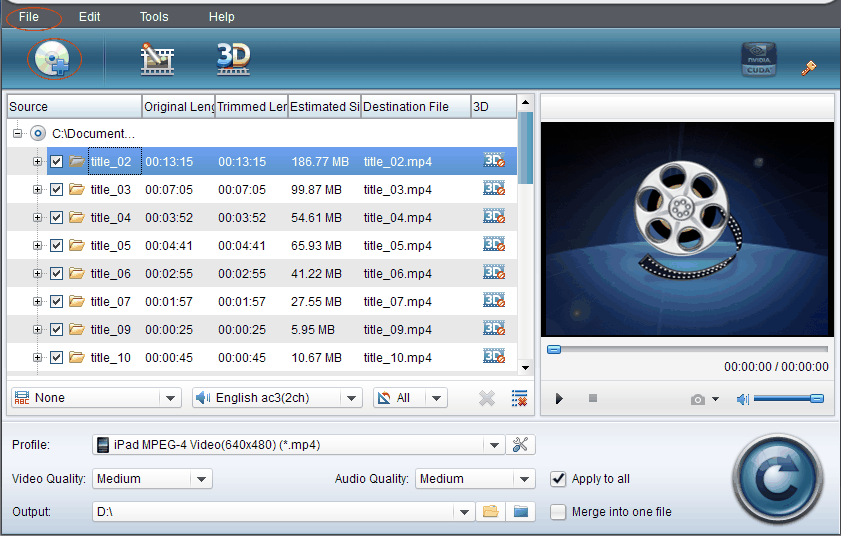
  • Input DVD from local computer to Leawo DVD Ripper.
  • Leawo DVD Ripper
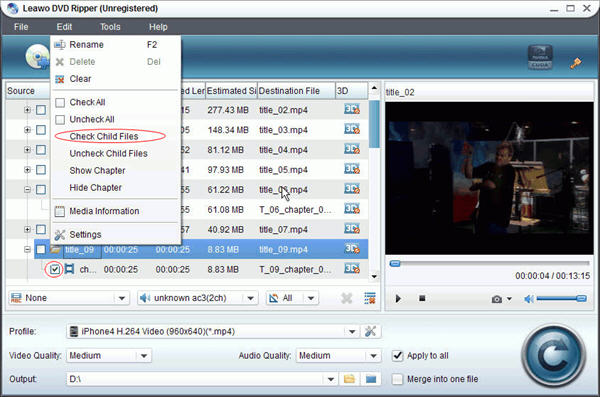
  • Check the DVD chapters you want.
  • Leawo DVD Ripper
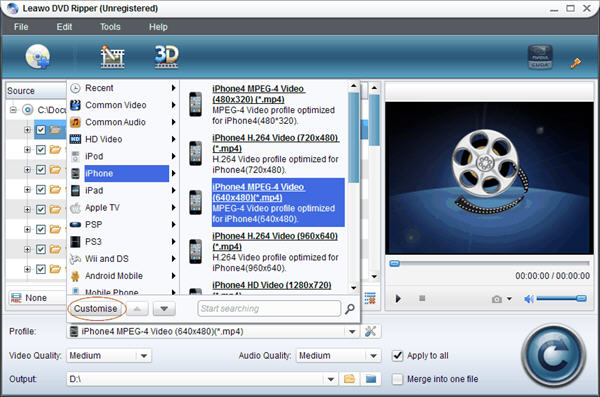
  • Set output file format.
  • Leawo DVD Ripper
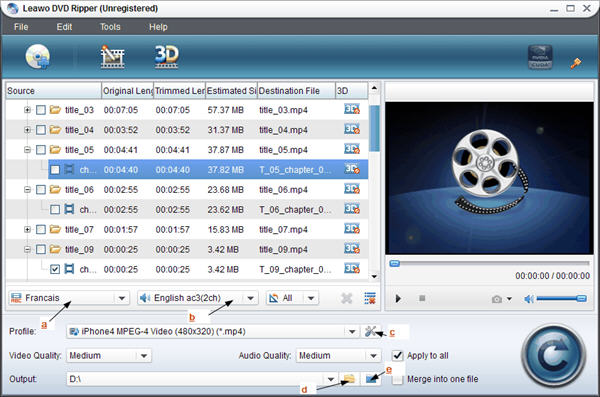
  • Set video size and video quality.
  • Leawo DVD Ripper
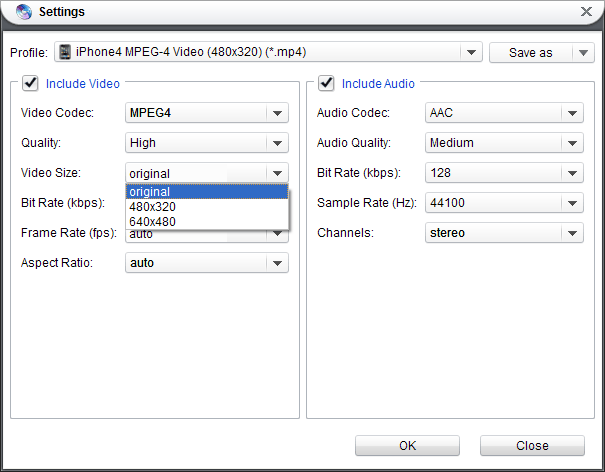
  • Set the video quality and video codec.
  • Leawo DVD Ripper
  • Click the convert button in low right corner to start the conversion.
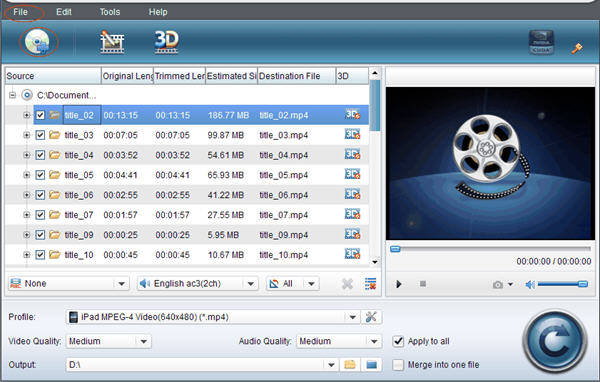
  • Leawo DVD Ripper
Besides the basic function, Leawo DVD Ripper can also edit DVD, add watermark, convert 2D to 3D, merge files into one and setting DVD video effects, etc. If you have high requirements in DVD playback, have a try. You can refer to Leawo DVD Ripper user guide.

Related Articles:

Monday, September 24, 2012

The First Two Windows 8 Phones: HTC Windows Phone 8X vs. HTC Windows Phone 8S

HTC Windows Phone 8X vs. HTC Windows Phone 8S
HTC announced the first two windows phones, HTC Windows Phone 8X and HTC Windows Phone 8S last week. Though they came to the word at the same time, there are still some differences between the two windows phones.

HTC Windows Phone 8X vs. HTC Windows Phone 8S
SpecsHTC Windows Phone 8XHTC Windows Phone 8S
Size132.35 x 66.2 x 10.12 mm120.5 x 63 x 10.28 mm
Weight130 grams with battery113 grams with battery
Display4.3 inch touch screen with Gorilla® Glass 24 inch super LCD touch screen
ResolutionHD 720pWVGA resolution
CPUQualcomm® S4 1.5 GHz, Dual-coreQualcomm® S4 1 GHz, Dual-core
MemoryTotal storage: 16 GB, available capacity varies
RAM: 1GB
Total storage: 4 GB, available capacity varies
Expansion SD card slot supports micro™ SD memory card for additional storage (card not included)
RAM: 512 MB
Connectivity3.5 mm stereo audio jack
NFC capable
Bluetooth 2.1+EDR
Wi-Fi®: IEEE 802.11 a/b/g/n
3.5 mm stereo audio jack
Bluetooth® 2.1+EDR
Wi-Fi®: IEEE 802.11 b/g/n
BatteryEmbedded & rechargeable Li-ion Polymer battery
Capacity: 1800 mAh
Embeded & rechargeable Li-ion Polymer battery
Capacity: 1700 mAh

MultiMedia Playback
Both HTC Windows Phone 8X and HTC Windows Phone 8S are able to play the audio and video formats in the list below:
  • Audio: .aac, .amr, .m4a, .mp3, .wav, .asf, .wma (verison 9 and 10)
  • Video: .3gp, .3g2, .mp4, m4v, asf, .wmv (version 9 and 10)
  • Recording: .wav and .mp4
These two windows phones really support in playback better. As to the single recording formats, these free video converters will help you make conversions so that you can play them on more devices and share on more websites.

Camera
The HTC Windows Phone 8X features an 8-megapixel primary camera with autofocus, LED flash, geo-tagging, touch focus and 1080P video capture with continuous autofocus and video lighting, while the HTC Windows Phone 8S sports a 5-megapixel primary camera which also offers autofocus, LED flash, geo-tagging, touch focus and face detection, along with 720P video capture.

HTC always bring us a colorful world, and this time it does too. The different cover colors are waiting for you to select. If you are tired of Android and iOS phones, HTC windows 8 may be your next choice.

Thursday, September 6, 2012

Can I Play SWF Flash on Nokia Lumia 920?

ASK

  • Can I play flash games on Nokia Lumia 920? It's my birthday gift from my sister. And I never owned a Windows phone before. Anybody help?

Answer

Nokia Lumia 920
Nokia's latest Windows 8 Phone - Nokia Lumia 920, has come to the world. This 4.5'' Windows 8 Phone weigh 185g. The resolution of its touch screen is 1280x768. In windows os phone, Office Applications is included of course, such as Excel, Word, Powerpoint and One Note. All of above are supported by dual-core 1.5Ghz Snapdragon S4 processor and 2000 mAh battery capacity.

Play SWF on Nokia Lumia 920
In Android smartphones, you can find many free swf players in Android market, though Adobe Flash Player will never support Android platform.

Unlike Android smartphone, I can't find anything about Adobe Flash Player on Nokia Lumia 920 official website. At the same time, I searched adobe flash in Windows Phone APP Marketplace, the same result too. So, if you want to play swf flash videos on Nokia Lumia 920, the only way I can suggest you is, converting swf to videos which Nokia Lumia 920 supports.

According to Nokia, Lumia 920 can play MP4, WMV, 3GP, M4V, and M4A videos in VC-1, H.264/ACV, H.263 and MPEG-4 codecs. Then, the solution is here - convert swf now.

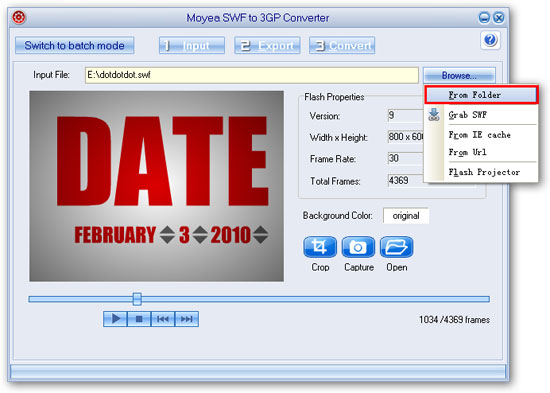
Actually, you don't have to pay anything cause Moyea provides a free and professional SWF to 3GP converter for users. Follow the steps on its tutorial webpage and get what you want. This is an image of its kindly and uncomplex interface.

If you need to download swf flash videos from internet, another FREE tools provided by Moyea will help you - Free Flash Downloader.

Play more on Nokia Lumia 920

Wednesday, September 5, 2012

Convert and Play DVD on Samsung ATIV S

ASK

  • How can I play DVD on Samsung ATIV S?

Answer

samsung ativ s
Samsung ATIV S,  a flagship smartphone based on Windows Phone 8, was unveiled this month together with the ATIV brand, including smartphone, tablet and pc. It shares a few common features with the Galaxy S3.

The thickness of ATIV S is 8.7mm and it has a 4.8-inch HD Super AMOLED display. A button which looks like a front facing camera and a Windows 8-like home button is on its board.

Talking about the hardware, the ATIV S has a 1.5Ghz dual-core processor, 1GB of onboard RAM, and an 8MP autofocus rear camera and 1.9MP front-facing camera. This is a massive jump from the MSM8255T single-core model. The MSM8960 should also boost the graphics capabilities of the handset as well. It will be available with either 16GB or 32GB of storage, a MicroSD slot (up to 64GB) and a 2300mAh battery.

The phone is 4G capable, NFC capabilities and smaller tiles. It supports HSPA+ 42, WiFi 2.4GHz/5GHz Dual Band, and HT40 Channel Bonding.

In multimedia playback, Samsung ATIV S is able to play MP3, WMA, MP4, M4V, ACC audio files and H.263, H.264, WMV, MP4, M4V and MOV video files.

If you want to play DVD on this Windows 8 phone, the existing hardware and software isn't enough to finish this operating. The only way is converting DVD to videos, which are allowed to be played on Samsung ATIV S. You can try Leawo DVD Ripper.
After ripping videos from dvd disc, you can play the videos on Samsung ATIV S.

Tuesday, September 4, 2012

How to Play DVD on Nokia Lumia 920

nokia lumia 920

Nokia Lumia 920 and Lumia 820 will be unveiled this wednesday at a press event in New York. Unlike the Lumia 900, which was held back by WP7's antiquated hardware requirements, the 920 is a bona fide superphone. Both of the two smartphones base on Windows 8.

The bright spot is wireless charging, which will be provided via a built-in magnetic induction loop. The phones will reportedly support the Qi wireless power standard, developed by the Wireless Power Consortium. With Qi tech, you will be able to charge the Lumia 920 by simply placing it on a wireless charging mat. In theory, you should be able to use a generic Qi charging mat ($10-15), or you can buy a very colorful wireless charging mat from Nokia which will probably cost more. The 4.5-inch Lumia 820 and 920 handsets will use inductive charging in which contacts on the device will line up with contacts on a charging pad.

After being bundled with PureView, they can capture up to 41 megapixels of digital information.  It owns a 4.3-inch AMOLED display with the resolution of 1280 × 720. Nokia Lumia 820 is expected to feature 8GB of storage, and 920 is expected to feature 32GB of device storage, and 1GB of RAM. All of above are supported by a 1.5GHz dual-core processor and 2000 mAh battery capacity.

The HDMI support allows your phone to stream photos and videos to your LCD TV using an HDMI cable. But if you want to play DVD on Nokia Lumia 920, this unidirectional port isn't able to do this. The only way is ripping videos from DVD.

Friday, August 31, 2012

How to Play DVD on Samsung ATIV S

Samsung ATIV S
Samsung ATIV S was unveiled with Samsung ATIV Tab at IFA in this week. It is the first Windows Phone 8 unit from Samsung. The phone looks an awful lot like the Galaxy S III, Samsung's current flagship Android handset.

Operating System
The handset runs on Microsoft's upcoming Windows Phone 8 mobile operating system, based on a 1.5GHz dual-core Qualcomm Krait CPU and 1GB RAM.

Design Size
Samsung ATIV S is 8.7mm thick, which is thin enough that Samsung felt comfortable calling it a "chic hairline design" at the unveiling. It weighs in at 135 grams.

Display
ATIV S comes with a 4.8-inch Super AMOLED screen with HD resolution and Gorilla Glass 2 protection. It has an 8-megapixel rear camera paired with a 1.9-megapixel front-facing one, which make it has nice capabilities in images.

Software
Based on Windows 8 operating system, ATIV S has Microsoft Office applications. So, don't worry about store and access the files.

Ports
It is confirmed that a HDMI output port is on ATIV S. So, it's easy to play videos from this Win 8 smartphone on HDTV. But if you want to play others, such as DVD on ATIV S, a converter is needed. Rip videos from DVD discs and play them on ATIV S.

Connection
In addition, the mobile phone has Wi-Fi 802.11 a/b/g/n connectivity, Bluetooth 3, and Near Field Communication. There's also compatibility for HSPA+42.

Storage
Users can also choose between 16 GB and 32 GB models, which can be expanded with a microSD card. 2,300 mAh battery.

Price
Samsung doesn't give the exact information about the price and releasing date. According to the rumors, it may hit the stores after the Windows Phone 8 being available.

Monday, July 23, 2012

Does Droid Razr Maxx Support Playing Flash?

ASK

  • Does the Droid Razr Maxx support adobe flash player?
  • Could I play flash games on Droid Razr Maxx?

Answer

droid razr maxx
Droid Razr Maxx's high light is its larger battery. "One Day One Charge" is standing by 21.5 hours of talk time.

Early this year, Motorola Droid Razr Maxx runs Android 2.3. In June, it updates to Android 4.0. It's really a good news for fans.

Besides, tt comes with 130.7 x 68.9 x 9 mm and 145g and this 4G LTE Android phone also supports a large 4.3'' HD screen, 1.2 GHz dual-core processor, front-facing camera, 8-megapixel main camera, and 1080p HD video capture.

Droid Razr Maxx has Adobe® Flash® Player 10 installed. So, there isn't any problem when you are playing flash games in web browser. But if you want to play flash games offline on this android smartphone, it's not enough.  Adobe Flash Player with Droid Razr Maxx is browser-based.

Play SWF flash videos
Flash games are saved in .swf. So, if you want to play local swf files, android swf players are needed, such as Smart SWF Player. There are Top 8 Free SWF Players for Android. Converting swf to video is another way to view flash videos better.

Play FLV flash videos
Like .swf, .flv is another common flash video format. When you are playing .flv on webpage, Adobe Flash Player works. When you are willing to play .flv from folder on your android smart phone, professional player is also needed. Just like FLV Player.

Enjoy your Droid Razr Maxx life!

Related Articles:

Saturday, June 30, 2012

How to Play SWF on SamSung Glaxy Note II?

ASK

  • How to Play SWF on SamSung Glaxy Note II ?

Answer

SamSung Glaxy Note II
The Samsung Galaxy Note 2 (as it will most likely be named) is expected to sport an even larger display than its 2011 brother. Word has it the Note will utilise a 5.5-inch WSXGA+ (1680x1050) Super AMOLED display with a pixel density of 360ppi. Samsung could of course opted for a FullHD display, but with the human eye struggling to determine individual pixels past the 300ppi mark at the distances the device will most likely be held from their face, FullHD would be somewhat overkill.

Samsung Galaxy Note can't play SWF videos directly. The video player doesn't support .swf. So, we need to install another SWF player for android devices. Like its brother, I think Samsung Galaxy Note II has to face the same problem. There is still another way to view SWF videos - converting swf to mp4. Samsung Galaxy Note supports MP4 videos.

Play More on SamSung Galaxy Note II:

Friday, June 29, 2012

How to Play DVD on Samsung Galaxy Note II

ASK

  • How to Play DVD on Samsung Galaxy Note II?

Answer

Samsung Galaxy Note II
It is already a great talk about Samsung Galaxy Note 2 that the second version of the now famous hybrid between smartphones and tablets which debuted with good sales data a few months ago. The second Samsung Galaxy Notes has been debut at the MWC 2012 that the Mobile World Congress in Barcelona in Spain reveals that every year many new models.

It will always be equipped with a large display of more than 5 inches so as to place them in the middle ground between smartphone and one tablet. Samsung Galaxy Notes 2 will probably always be a display with the same 5.3-inch with 1280 x 800 pixel resolution for quality HD, already on board will come with the operating system Android 4.0 Ice Cream Sandwich is a crime and do not imagine that the processor can be a quad core product directly into the house and branded Samsung.

Galaxy Note allows users connect with HD TV with HDMI Adapter. Samsung Galaxy Note II may   have the same function with it. But how to play dvd on Samsung Galaxy Note II is still a problem. I think, the best and only way is rip DVD and play the output video on this latest phone.

Play More on SamSung Galaxy Note II:

Thursday, June 28, 2012

How to Play SWF on Samsung Galaxy S3

ASK

  • How to Play SWF on Samsung Galaxy S3?

Answer

Samsung Galaxy S3
This is what we call seeing reality. 4.8 inches of high definition display and vivid viewing experience. With true colors and ultrafast response times, HD video playback is outrageously sharp. It’s also incredibly energy efficient and amazingly thin. Samsung Galaxy S3 is really a great phone for you.

Online flash videos are always embeded as flv videos or swf videos. They can be played smoothly through web browser under the help of Adobe Flash Player. But Adobe Flash Player doesn't work while playing local SWF files or FLV files. And now, you need SWF players for android devices. Andorid Market provides many free or professional SWF players and viewers. After installing one of them, open your SWF files with it.

Play More on SamSung Galaxy S3:

Wednesday, June 27, 2012

How to Play FLV Files on Samsung Galaxy S3

ASK

  • How to Play FLV Files on Samsung Galaxy S3?

Answer

Samsung Galaxy S3
Whether it’s the ocean’s horizon or a majestic forest of Nordic firs, one thing is apparent: there are no straight lines in nature. The Samsung GALAXY S III’s minimal and organic design is reflected in its smooth and non-linear lines. Its human-centric nature provides an ergonomic and comfortable experience with enhanced usability. Its comfortable grip, gentle curves and platinum organic form deliver a natural look and feel.

Samsung Galaxy S3 is not able to play FLV files directly. Go to Android Market and find a free FLV player to play local FLV files from folder instead of online flash videos.

Play More on SamSung Galaxy S3:

Tuesday, June 26, 2012

How to Play DVD on SamSung Galaxy S3

ASK

  • How to Play DVD on SamSung Galaxy S3?

Answer

SamSung Galaxy S3
The design of the Samsung Galaxy S3 is similar to its predecessor but different at the same time. For starters the phone is much more rounded with smooth flowing lines and rounded corners and edges, somewhat like the Galaxy Nexus. It looks much sleeker than the Galaxy S2.

The Galaxy S3 offers the slickest Android Ice Cream Sandwich experience we’ve seen thanks to a 1.4Ghz quad-core Exynos processor, which eats 1080p movies for breakfast and can even play them in a pop-up window while you browse the web. 'Extras like the microSD slot and larger battery give it the edge over HTC’s One X, and the 4.8in Super AMOLED screen is sharp and vibrant.

A special Galaxy S3 HDMI adapter that has to be purchased separately is needed to hook up the Samsung handset to compatible HDTVs. But DVD can't be played on Samsung Galaxy S3 directly. The only way is converting dvd to video, such as MP4.

Play More on SamSung Galaxy S3:

Monday, June 25, 2012

How to Play SWF on SamSung Galaxy Nexus

ASK

  • How to Play SWF on SamSung Galaxy Nexus?

Answer

SamSung Galaxy Nexus
Galaxy Nexus from Google™ is the latest Nexus experience device and the first phone to feature the latest platform Android 4.0, Ice Cream Sandwich. It combines the best from Google and Samsung, with the most advanced software from Google paired with cutting edge hardware from Samsung.

It's easy to play online flash videos through web browser. Adobe Flash is the only thing needed. To play SWF files from local folders, you need to download SWF players for android devices.

Play More on SamSung Galaxy Nexus:

Friday, June 22, 2012

How to Play FLV on SamSung Galaxy Nexus

ASK

  • How to Play FLV on SamSung Galaxy Nexus?

Answer

SamSung Galaxy Nexus
The Samsung Galaxy Nexus is the world's first phone to run Android 4.0 (Ice Cream Sandwich) and comes with a plethora of top end tech, including a huge but still massively high resolution screen.

ce Cream Sandwich fuses together last year's Gingerbread OS for phones and Honeycomb for tablets and gives us a whole new, futuristic Android device to get to grips with.

On top of that, the specs include a fantastic Super AMOLED HD screen, Dual-Core 1.2GHz processor, HSDPA, 5MP camera and NFC support, to name a few.

Galaxy Nexus can't play local FLV files directly. A FLV player for android is needed to be installed on it. You can choose a free one you like on Android Market. Then, open local FLV files.

Play More on SamSung Galaxy Nexus:

Thursday, June 21, 2012

How to Play DVD on SamSung Galaxy Nexus

ASK

  • How to Play DVD on SamSung Galaxy Nexus?

Answer

SamSung Galaxy Nexus
The Galaxy Nexus is the third official phone contracted by Google and the first phone to come with Android 4.0 Ice Cream Sandwich. Specs include a 1.2GHz dual-core processor, 1GB of RAM, 16/32GB of internal storage, a 4.65 inch 720p HD Super AMOLED display, a 5 megapixel camera with 1080p HD video recording, a 1.3 megapixel camera and a lot more.

Galaxy Nexus has a HDMI output port. It make Galaxy Nexus be able to connected with TV, DVD player, Blu-Ray player and etc. Contrarily, playing dvd on Galaxy Nexus is not as easy as it. First, you need to rip dvd and get video files. Then the video player will do the other things.

Play More on SamSung Galaxy Nexus:

Wednesday, June 13, 2012

Is it possible to play flv on LG Optimus 3D Max?

ASK

  • Is it possible to play flv on LG Optimus 3D Max?

Answer

LG Optimus 3D MaxThe LG Optimus 3D Max is now available, the first stop in a global rollout for the followup to last year’s glasses-free 3D handset. We first saw the Optimus 3D Max at Mobile World Congress where LG showed off the slimmer, lighter handset. Measuring in at 2MM thinner than the original, the 9.6mm handset still packs a 1.2GHz dual-core CPU, 1GB RAM, and 8GB of internal storage within the frame of a 4.3-inch WVGA parallax barrier display.

Adobe Flash supports playing online flash video when looking through webpages on internet. Just like swf, you need to download a flv player for android to play local flv files on LG Optimus 3D.

Tuesday, June 12, 2012

How to Play SWF Files on LG Optimus 3D Max

ASK

  • How to Play SWF Files on LG Optimus 3D Max?

Answer

LG Optimus 3D MaxIt was announced at MWC 2012 earlier this year and is the successor of the LG Optimus 3D that was launched last year and it comes with 4.3-inch (800 x 480 Pixels) IPS display with Corning Gorilla Glass 2 protection that would offer Glasses-Free 3D viewing and is powered by 1.2GHz dual-core processor. It runs on Android 2.3 (Gingerbread) and is just 9.6mm thick and weighs 148g with metallic and rounded edges. It has Dual 5MP Auto focus cameras with flash and VGA front facing camera. It has 1GB RAM, 8 GB internal memory that is expandable up to 32GB with MicroSD. The connectivity features include 3G HSPA+ 21Mbps, Wi-Fi, Bluetooth 3.0 , aGPS, HDMI via MHL and GPS / aGPS. It has 1,520 mAh battery.

Adobe Flash on LG Optimus 3D Max supports owners view flash video online, but doesn't work while playing local swf files. You need a swf player for android, such as Smart SWF Player- Flash Viewer. For huge swf files or the ones embedded lots of animations, converting swf to video is a better way. The videos will keep everything from original documents.

Thursday, June 7, 2012

How to Play FLV Files on Sony Xperia P

ASK

  • How to Play FLV Files on Sony Xperia P?

Answer

Sony Xperia P
Feature set summary for Sony Xperia P review
The 8-megapixel snapper produces top daylight images, as well as offering a panoramic facility and shooting 1080p HD video. The display shows off photos and films well, and is good for surfing the net too. Plus the in-built NFC offers a degree of future-proofing.

Style and handling summary for Sony Xperia P review
The Sony Xperia P wins with its unusual looks, including the classy silver back and see-through shortcut bar. It is resistant to scuffs but the lip does add some width.

Battery power summary for Sony Xperia P review
Battery life is disappointing – less than 24 hours in general use, and you can cut that down to four or five hours if you’re streaming media – keep a charger handy.

Performance summary for Sony Xperia P review 
The dual-core chip ensures the Xperia P runs apps and games smoothly – and offers a degree of future-proofing for future titles.

User friendliness summary for Sony Xperia P review
The display is responsive, and with the added benefit of Android’s user-friendly interface this is a smooth, easy-to-use device. An Ice Cream Sandwich update in the near future would be the icing on the cake.

If you want to play flv online, Adobe Flash will help you.
If you want to play flv files from local folder, a flv player for android is needed. You can search a free one on android market.

Play More on Sony Xperia P:

Wednesday, June 6, 2012

How to Play DVD on LG ELectronics Viper 4G?

ASK

  • How to Play DVD on LG ELectronics Viper 4G?

Answer

LG ELectronics Viper 4GThe LG Viper is Sprint’s very first LTE phone. Despite being stuck with 3G speeds, though, the affordable LG Viper packs some high-quality specs for the price. The dual-core processor handled everything I threw at it with ease, the 5-megapixel camera took good pictures, and the addition of Google Wallet is not too shabby. The 4-inch WVGA display’s resolution is somewhat lower than top-tier smartphones at 480-by-800 pixels. If you plan on using the Viper only to browse the Web, check e-mail, and do some casual gaming, the display should be sufficient.


LG ELectronics Viper 4G owns a HDMI output ports. This allows it connect with TV to show on TV. But there isn't any HDMI input. So, we can't play DVD on  LG ELectronics Viper 4G directly, unless you rip dvd to video.
Play More on Sprint LG Viper 4G LTE:

Tuesday, June 5, 2012

How to Play DVD on LG Extravert?

ASK

  • How to Play DVD on LG Extravert?

Answer

LG ExtravertSlim, sleek, and feature-packed, this handset boasts a touch screen and QWERTY keyboard for unsurpassed messaging speed and convenience. Extravert includes a 2.0 megapixel camera, Bluetooth® stereo support, a customizable home screen, and a Favorites Key that enables users to connect with their most frequent contacts in a flash. Get ready for the ultimate handset for messaging enthusiasts.

LG Extravert owns a HDMI output ports. This allows it connect with TV to show on TV. But there isn't any HDMI input. So, we can't play DVD on  LG Extravert directly, unless you rip dvd to video.


Play More on Sprint LG Extravert: